An Introduction to Character Sets
25 September 2014
If you’ve worked with text data long enough, you’ve probably come across issues with garbled characters and character set incompatibilities. As someone who writes software that often complains at linguists about this kind of thing, I thought it would be useful to outline the issues, and explain what causes the problems, why they’re still problems after decades of computing, and why there are no easy solutions.
Caveat emptor: This is my first attempt at a long-form article, so it might suck.
Note: This was written as a casual brain-dump, and is full of generalisations and likely a few errors. I’m correcting them as I discover them and will redraft it properly, since it seems people are actually reading it.
A little History
For this section to be useful, a few technical distinctions need to be made. First up, I should clarify that I’m talking about digital computers: analog ones have been around for ages and generally aren’t relevant to modern life (but they sure are cool).
When people first started building digital computers, there was some debate on how to represent numbers using the hardware they had available. At the time people mainly wanted computers to do the bits of maths humans find tricky such as working out kinematic trajectories and the like, so many were designed to process only floating point numbers. Significantly, however, binary won. Most computers after the 50s used binary storage, and continue to do so now because it’s easy to engineer using semiconductors (and the maths works out nicely, as we shall see). Binary allowed the storage of numbers using two states representing ‘0’ and ‘1’: this could take the form of whether or not a current can pass down a wire, the position of a magnetic ring in a grid, or whether or not some paper fills a hole. These days we use semiconductors and magnetism, but the theory is the same.
What relevance does this have to character sets? Well, as computers became general-purpose computing devices, and as display technology improved, it became necessary to represent text somehow. For systems that were designed merely as reprogrammable calculators, this is a bit of a step change: we have to map those numbers into the text that humans can understand. Doing so touches on the very basis of computer science as a field.
Information Theory
So, we’re storing things as binary. The issue is that a single bit can just represent two states: we assign some meaning to the ‘1’ and the ‘0’, but then we’re out of luck. Our computer isn’t much good if it can only represent two possible decisions, so we have to group them into a more meaningful set: a byte. For this to work, everything in the machine must agree on the size of this byte: it must be an atomic unit of meaning.
Quite how many bits to assign to a byte is another thing that varied wildly throughout the history of computing. This is because the actual bits themselves were usually pretty expensive, and storage technology was fairly limited. After some disagreement (which will be relevant, I promise), we settled on 8. These days it is pretty much impossible to find a computer that doesn’t use 8-bit bytes. This means that, in a modern machine, it is not possible to read or write under 8 bits of information at a time.
If we wish to represent text based on the value of these bytes, some mapping has to be made between the value of the byte and the character we wish to represent: 1 = ‘a’, 2 = ‘b’ and so on. This mapping is, essentially, the definition of a character set.
The first commercially available hard disk could represent 5 million characters, but each one was represented by only 6 bits, which means that each character could be one of 64 possible things. That’s it: just enough space for a-z and some punctuation. These days we’re a little better off, but not much: each 8-bit byte can represent one of just 28 = 256 characters.
The Birth of Charsets
As computers were made, each one came with its character set designed to provide a useful interface to the machine. This meant that, in addition to the usual English characters such as A-Z, punctuation, etc., they often contained lines and boxes and other such things needed to lay out a text user interface. They also included ‘control characters’, which told the display to do things like change colours or move the cursor (in a glorious show of path dependence, all of these things still exist in modern character sets).
This system generally works pretty well, until you start moving data out of a machine. What makes sense to one is just a load of garbled nonsense to another. Even worse, there is no way to detect a character set because the data is always just numbers: the mapping is applied by the machine viewing the text. Clearly, some standards were needed.
Enter ASCII — The ‘American Standard Code for Information Interchange’. This 7-bit encoding was designed so that people’s teletype terminals could speak reliably to their computers, and it was so successful as a standard that it remains the basis of most character sets today.
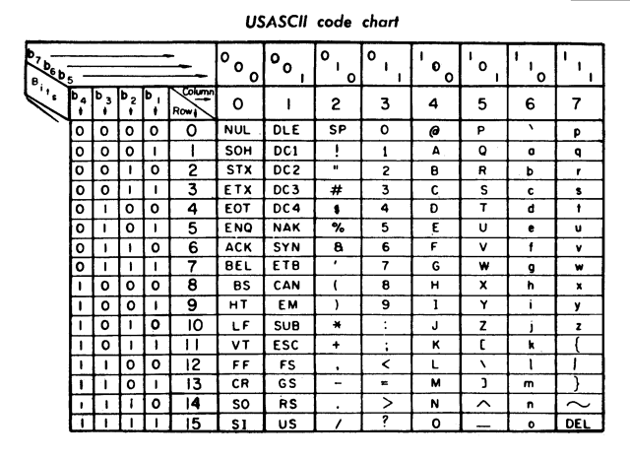
Note the way the table above was laid out by the authors: the lower four bits are down the left hand side, and the top three are along the top: this chart is quite obviously a 1:1 mapping between the values in a 7-bit byte and the character to display. Values below 33 (0x21: the chart is written in hexadecimal) are used for control characters (7, for example, makes the display sound a beep rather than display a character).
ASCII is pretty ubiquitous these days, but it did have competitors: EBCDIC was IBM’s standard format for a while and some EBCDIC-encoded files still crop up. Note that EBCDIC is entirely incompatible with ASCII: ‘a’ in ASCII is represented by value 97, but anything assuming EBCDIC will read this as a slash (’/’). EBCDIC’s value for ‘a’ is actually 129, which requires 8 bits to encode and so can’t even be used with the ASCII table at all.
Moving on from ASCII
ASCII was, once hardware had caught up in the 80s, essentially the standard for text encoding. Most western character sets, even those that didn’t fully copy ASCII, were compatible with the basic text bits, and so could be used to send text back and forth with impunity.
You’ll note that earlier I said most modern computers have 8 bits of storage for each character though, and ASCII’s a 7-bit encoding. What to do with the extra bit? Well, this is where the story becomes relevant to your everyday life (and all it took was ~1k words). That measly extra bit allows us to encode another 128 values: 128 with the bit set to 0 (the normal ASCII set) and 128 with the bit set to 1 (which we can make up).
This extra bit allows us to get some characters with accents, symbols such as ¼, etc. without destroying compatibility with any existing ASCII code. Since so many languages require characters not in the ASCII encoding, people came up with many different ways to map this top 128 set of values: these are generally called ’extended codepages’, a codepage being a subset of a character set (though sometimes they’re used interchangeably). There’s a boggling array of these.
So, though we have a fairly well-respected standard, we’ve now managed to get some ambiguity on the top 128 values. This means that even if you have an ‘ASCII’ file, you can’t be sure if it contains extended values from one language or another: this is a common issue, and you will often see a text which looks fine except for the accents, etc.
The situation at this point in history (somewhere around the 90s) is that you’re probably okay sharing a text file with someone in the same language and country. Still a bit of a minefield though.
One code to rule them all
8-bit encodings will always be limited to 256 different characters: there’s not much we can do to standardise language choices until every charcter in every language can be represented uniquely. This is, effectively, the goal of unicode. Even the name’s a clue.
Unicode is essentially a collection of standards, the most important being (for this story) the ‘Universal Character Set’ (UCS), which contains some 110,000 different characters. In defining such a massive charset, unicode can be tricky to represent: a little maths indicates that we need ln2(110,000) ~= 17 bits to represent a character (in practice there is space to expand, and the UCS is organised into a 31-bit space). Nevertheless, UCS is still ASCII-compatible: the bottom 7 bits stay true to the ASCII we know and love.
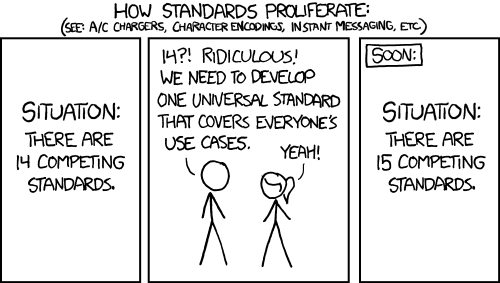
So, we have this massively unweildy character set, and wish to represent it on a computer. In an XKCD-inspired twist of fate, people came up with various different standards for representing the UCS values themselves: the disagreement is no longer what the numbers mean, but how to store the numbers. Ack.
Common Encodings
So here we are, in 2014. Some 60 years of computing history and very little consensus. There are a number of encodings still in use, however, they are usually just ASCII with a different set of characters represented by that last bit. This list covers the ones you’ll probably see when working with latin-script text.
ISO8859-1 / Windows-1252
These two character sets are extremely similar and often confused as they are (almost) compatible in all but the control character range. For the purposes of this discussion I’ve treated them the same.
These are the most common latin script ASCII-based 8-bit character sets, providing ASCII plus some basic maths and layout symbols. ISO8859-1 is the default encoding for HTTP, so you might find that lots of web pages are encoded using this (or mistakenly identified thereas).
Latin-1
Latin-1 is the upper range from ISO8859-1, represented in unicode. You might see a file ’encoded in latin-1’, in which case this means that it’s compatible with all 8 bits of ISO8859-1. Simples.
UCS2 and UTF16/32
The UCS encoding approach introduces the concept of a ‘wide character’, which is simply any single character represented by more than one byte. UCS2 simply represents each character with two bytes, and UCS4/UTF32 with four.
These encodings are incredibly inefficient: if you only use the latin script, you’re probably wasting half of the size of the file storing empty bytes. They have some advantages, however, mainly it’s possible to compute the number of characters in a text by taking its size in bytes and dividing it by half (something not possible with UTF8). WordSmith uses UCS2, presumably for this reason.
The UTF16 encoding is essentially the same as UCS2, except that it has provisions to double up some characters using the same semantics as UTF8 below. The UTF16 encoding is often what Windows calls ‘unicode’ (this is because Windows internally uses UTF16 for its API). Beware: everywhere else, ‘unicode’ means UTF8.
Note that UCS-2 and UTF16/32 are not ASCII-compatible at all. Try to load UCS2 text into an ASCII text editor and it will set every other character to a blank space.
UTF8
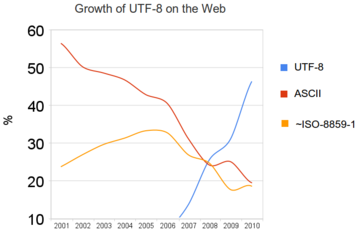
UTF8 is the winner of the UCS encoding wars, and has become the de-facto standard for text online. From the 2000s onwards, most systems work natively in UTF8, meaning that you can basically assume any file on them is UTF8 by default. Windows dragged its heels a bit and still writes Windows-1252 and UTF16 files from time to time—this is the cause of most of the encoding problems people run into.
UTF8 encodes characters using a far more complex format than the other encodings I’ve mentioned. Essentially, characters that are in the standard latin-1 codepage are encoded in a single byte. The lower 7 bits are compatible with ASCII (and thus all of the other ASCII-compatible encodings above), making it backwards-compatible for simple texts. When you need a character from another codepage, things get fun: the top two bits are used to indicate that a wide character is to be read. If the parser reads a leading ‘11’ or ‘10’, it keeps reading more bytes of file. Using this scheme characters can be anything from 8 to 32 bits long, encompassing the whole UCS.
This approach, in its staggering complexity, comes with some issues:
- Firstly, it’s impossible to calculate the length of a string without reading it (because all the characters are all different lengths).
- It’s possible to tell the unicode spec to represent numbers that don’t exist in UCS (32 bits is almost double the number of characters that UCS contains, so half of it is empty). When this happens, unicode is supposed to reply with the oh-so-familiar ‘�’ character.
- It’s not possible to parse a UTF8 string without starting at the beginning, because you might be starting half way through a wide character (there are a number of heuristics that make this possible in most circumstances though).
- Due to the way in which wide characters are encoded, it’s also possible to write an invalid sequence of bytes. This is another common error when parsing invalid UTF8 text: the parser will just refuse.
Nonetheless, it is fairly efficient compared to other schemes. To steal shamelessly from wikipedia:
The first 128 characters (US-ASCII) need one byte. The next 1,920 characters need two bytes to encode. This covers the remainder of almost all Latin alphabets, and also Greek, Cyrillic, Coptic, Armenian, Hebrew, Arabic, Syriac and TÄna alphabets, as well as Combining Diacritical Marks. Three bytes are needed for characters in the rest of the Basic Multilingual Plane (which contains virtually all characters in common use[11]). Four bytes are needed for characters in the other planes of Unicode, which include less common CJK characters, various historic scripts, mathematical symbols, and emoji (pictographic symbols).
Da BOM
There is one more issue I haven’t mentioned until now. If you are using wide characters, you have one more big issue: computers work at the byte level, and only the byte level. In order to stitch more than one byte together into a number you can use, you need to know which way around the bits are stored: this is called the endianness of a machine.
The designers of unicode attempted to work around this by including provision for a ‘Byte Order Mark’—this characters is designed to be the first entry in a text file, and its structure indicates the byte ordering of the file. Because most machines these days are little-endian, this mark isn’t used much. To quote Wikipedia:
The Unicode Standard permits the BOM in UTF-8, but does not require or recommend its use.
The BOM often betrays a file’s encoding: if you try to parse a UTF8 file with an ISO8859-1 or Windows-1252 parser, you will see the string  at the beginning. If you’re reading a UTF16 file with one of those encodings, expect to see ÿþ (little-endian) or þÿ (big-endian).
Errors and Annoyances
So, we have at least four commonly used competing specifications for how to interpret collections of bytes as text. Fun. Essentially, almost all of the errors encountered when processing text are the result of getting the input character set wrong, for example:
- Reading the unicode BOM as a normal character
- Trying to parse ASCII as unicode, and thus rendering a load of weird characters or ‘�’ symbols
- Reading one ASCII-based encoding as another, so mangling all of the accented characters
- Trying to load UCS2 or UTF16/32 as UTF8
Remember that it is not possible to identify the character set of a document ahead of time: the computer has to trust that it’s doing the right thing, because all it sees is a big list of bytes.
Converting between Charsets
Converting between charsets is ugly, and often doesn’t work well. The notable exception to this is converting to unicode, because UCS is such a vast superset of the other encodings.
One of the main issues is that it might not be possible to represent one character using another. This isn’t solvable, so often you’ll lose information by transliteration (for example, æ might become ‘ae’, or ‘Café’ may forever be reduced to ‘Cafe’).
The main problem with conversion, however, is that it’s impossible to automatically determine the input encoding. This means someone has to authoritatively state that that is, and they often get it wrong. If someone sends you a file and doesn’t tell you the encoding, the best you can do is guess…
Web Protocols
Many things, like the domain name system that lets you type in the name of this website, were designed when ASCII was the standard. Generally, they don’t work with unicode. This causes problems for cultures that want domain names but don’t use latin script, for example.
One solution for domain names is the IDN system, which converts unicode into ISO8859-1 by representing one character in unicode by a few in ISO8859-1. Most web browsers support this natively, allowing you to link to ɯɐʇʇɐʍuǝɥdǝʇs.com or bæta.net and converting it on the fly.
Security
The complexity of the UTF8 specification means that it is often difficult to ensure the safety of any implementations. Additionally, some features (such as adding arbitrary accents to text) make it possible for people to break layouts by continually shifting or changing symbols on the fly.
Some characters also look so similar to others that it’s possible for people to impersonate banks by registering similar-looking domain names and such. Spammers also use this tactic to defect spam filters.
Font Support
It’s pretty common to be reading something in UTF8, in a UTF8 compliant piece of software, and still get missing characters (or characters rendered in a default or ‘backup’ font (my upside-down domain name above usually looks sans-serif, despite being in a serif font).
This font mangling is due to missing characters in the font being used: due to the sheer size of the UCS, it is rare to find a font that covers every glyph. Often, fonts specify that they cover only the latin set, or latin plus certain extensions. For example, the font I use for this site, Rosarivo, supports only the ‘latin extended’ set.
What Should I Use?
Use UTF8. Set your operating system to use UTF8 by default, and write files as UTF8. This is [increasingly] the default for modern software.
Unicode is essentially a superset of all of the other extended-ASCII encodings, so you will always be able to convert back should some software need a file in a given encoding. UTF8 is the most widely used unicode spec, and is ISO8859-1-compatible for basic text files, so has pretty much everything covered.
Also, it lets you type this crap: ☺☻✌✍✎✉☀☆☮☯☎☏♕☣☠